
Key facts
- Creating a Digital Product Passport takes seven steps: check the rules for your product group, give each passport a persistent identifier, collect the data, decide who sees what, publish it, put the data carrier on the product, and keep it up to date.
- You can build one today. Only batteries have a fixed date, 18 February 2027. For other product groups the delegated act will set the final data list, so start with what every passport shares: the identifier, the carrier and the data you already hold.
- Most of the effort is the data, not the technology. The code, the resolver and the hosting are a small, predictable part of the cost.
- On Digital Link Connexum, the platform behind this site, a GTIN generates a QR code and a passport page from a category template, which you complete, translate and publish.
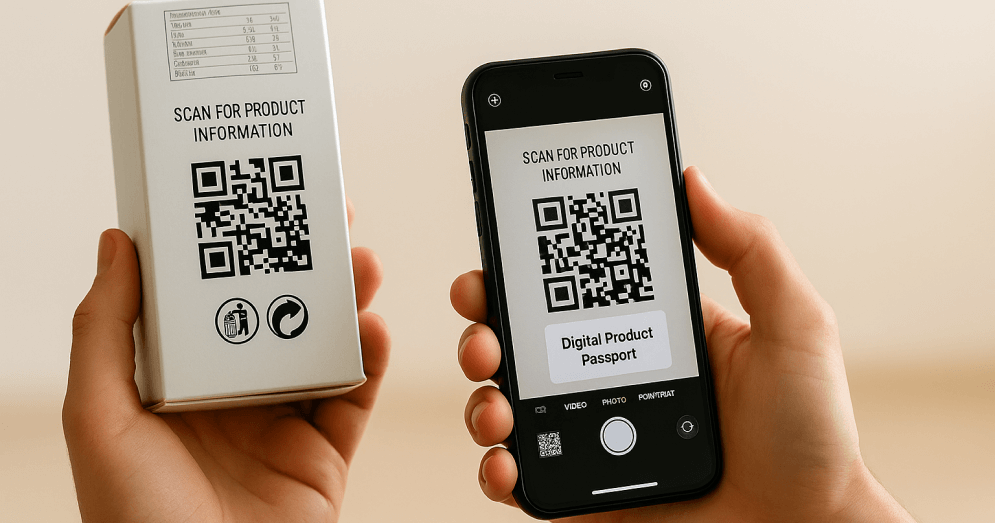
A Digital Product Passport (DPP) is a digital record of a product's identity, composition, environmental performance and end-of-life information, reached through a code on the product. To create one, you assign a persistent identifier to the product, gather and verify its data, publish that data online with the right access levels, and print a data carrier, usually a QR code, that points to it. The EU Digital Product Passport guide covers what the law requires and when. This guide is about doing it.
What you need before you start
| You need | Why | Where it comes from |
|---|---|---|
| The rules for your product group | They set the data list, the level (model, batch or item) and the data carrier | The delegated act for your group, or the Battery Regulation for batteries |
| A persistent unique identifier | Every passport must be connected to one | GTINs from your GS1 Member Organization, already behind your EAN or UPC barcodes |
| The product data | It is the content of the passport | Your ERP or PIM, your suppliers, your quality and sustainability teams |
| A place to publish | The passport is hosted by you or a provider, not by the EU | A DPP platform with a resolver, or your own infrastructure |
| A printable data carrier | It connects the physical product to the passport | Generated from the identifier, then added to your artwork |
How to create a Digital Product Passport: seven steps
- Check what your product group requires. Find the instrument that covers your products in the status table. Batteries follow Regulation (EU) 2023/1542 from 18 February 2027. Other groups follow their delegated act under Regulation (EU) 2024/1781, which sets the data, the level and the carrier. If your act isn't adopted yet, build on the framework requirements every passport shares.
- Give each passport a persistent identifier. Use the GTIN for a model-level passport. Add the batch for a batch-level passport, or a serial number for an item-level one. With GS1 Digital Link, all three levels are written into one web address, so the same code identifies the product and opens its passport.
- Collect and verify the data. Gather the information in the checklist below, from your own systems and from your suppliers. This is the longest step: plan time for supplier declarations, test reports and certificates, and decide who in your company owns each field.
- Decide who sees what. A passport has layers. The public sees identity, composition, performance, use and repair information. Repairers, recyclers and other operators with a legitimate interest see the detail they need. Authorities see the compliance documents. Set those access levels before you publish.
- Publish the passport. Put it online on a platform that stores it in an open, machine-readable format and keeps it available for as long as the law requires. A resolver behind your domain sends each scan to the right layer and language.
- Put the data carrier on the product. Print the code on the product, its packaging or its accompanying documents, as your rules specify. Respect the minimum size and the quiet zone, and test it on phones and on a 2D checkout scanner before the print run. See the legibility guide.
- Keep it up to date. Update the passport when the product, its data or the rules change. The code stays the same, so nothing is reprinted. When your rules require it, the identifiers are also registered in the EU DPP registry.
The data checklist
The exact fields come from your rules. These are the families almost every passport draws on:
| Data | Examples | Usually comes from |
|---|---|---|
| Identity | GTIN, model, batch or serial number, manufacturer, importer | ERP or PIM |
| Materials and substances | Composition, substances of concern, recycled content | Bill of materials, supplier declarations |
| Origin | Country of manufacture, key production sites | Supplier data |
| Environmental performance | Carbon footprint, durability, energy use | Life cycle assessment, test reports |
| Use and repair | Instructions, spare parts, repair information | Product and after-sales teams |
| End of life | Disassembly, sorting and recycling instructions | Sustainability or packaging team |
| Compliance | Declaration of conformity, certificates, test reports | Quality and regulatory team |
For a realistic budget, see how much a Digital Product Passport costs.
Building it on the Digital Link platform
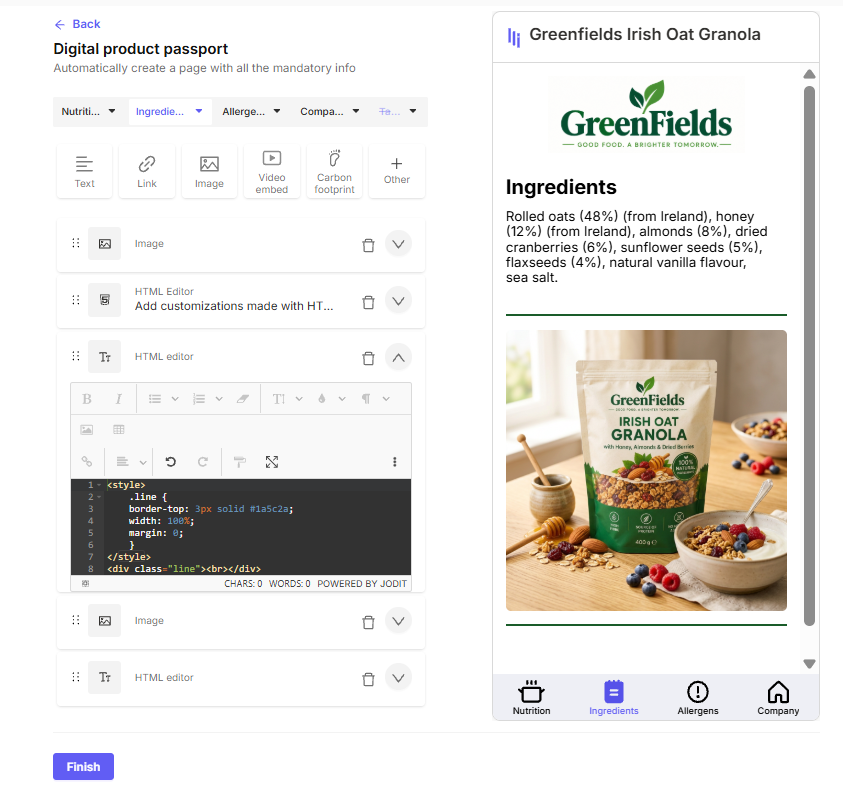
On Digital Link, the platform behind this site, the seven steps map to a few screens:
- Enter the GTIN. The platform validates it and creates the GS1 Digital Link and its QR code.
- Pick a category template. Templates cover food and beverages, wine and spirits, baby products, cosmetics and skincare, supplements and sports nutrition, and apparel and textiles, with the sections each category needs.
- Complete the sections. Add the data, images, documents and videos, then translate the page. Content can change by language and country from the same code.
- Set permissions and publish. Choose who in your team can edit, and who can see each layer.
- Download the code for your artwork, and update the passport whenever you need to.
Larger catalogues connect through integrations with ERP and PIM systems, or through the API. The Free plan covers 5 codes.
Create your first Digital Product Passport
Frequently asked questions
Can I create a Digital Product Passport before the rules for my product are adopted?
Yes. The framework requirements are already fixed: a persistent unique identifier, a data carrier on the product, open machine-readable data and access levels. Building those now means only the data list changes when your delegated act is adopted.
Do I need a GTIN to create a Digital Product Passport?
You need a persistent unique identifier, and for most consumer products that is the GTIN behind the barcode, assigned by your GS1 Member Organization. If your products already carry an EAN or UPC barcode, you already have one.
Does the EU host my Digital Product Passport?
No. You host it, or a provider does it for you. The EU registry stores the unique identifiers and links, not the passport data.
Can I change a Digital Product Passport after the product is printed?
Yes. The printed code points to the passport through its identifier, so you can update the content at any time without reprinting. Only a change to the identifier itself needs a new code.
Does a Digital Product Passport have to use a QR code?
No. Your rules choose the data carrier. For consumer goods that will usually be a QR code, but a Data Matrix or an RFID tag can also qualify.
How long does it take to create a Digital Product Passport?
Publishing the page and the code takes minutes. Gathering and verifying the data takes longer, from days for a simple product whose data you already hold to months for a complex product with a long supply chain.